
666D Game APK Features, Registration and Android Guide 2026
22 Nov 2026
13.8MB
v1.1
Android 5.0+
2000+
Description
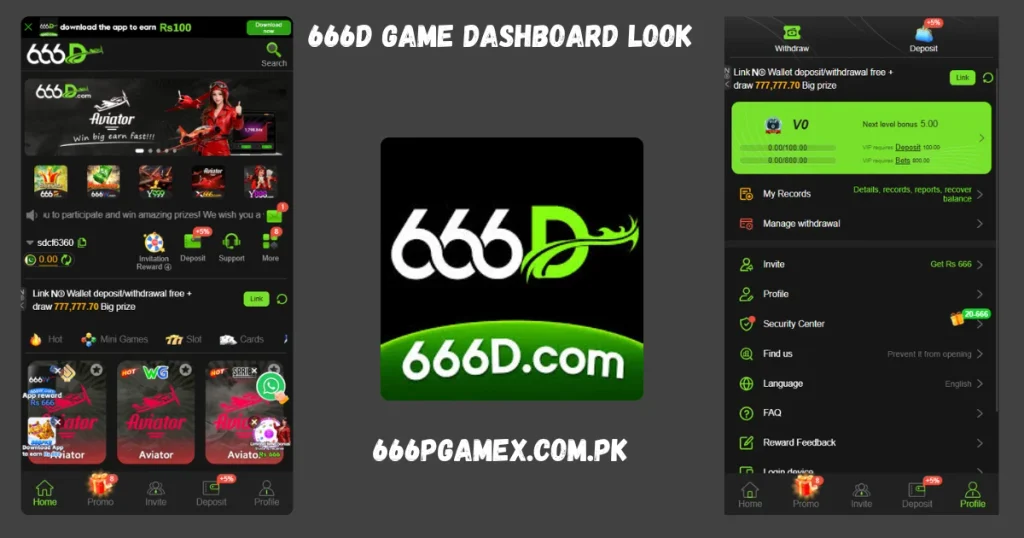
The home screen of 666D Game uses a dark layout with bright tiles, an Aviator banner and account shortcuts. A notice mentions daily bonuses, special offers and recent news. This guide covers the visible sections, registration, login and app access on 666D Game.
Explore the Home Screen
The Aviator banner appears near the top, followed by shortcut icons and categories: Hot, Mini Games, Slot and Cards. These labels help visitors browse by game type.
Tiles include Aviator, Chicken Road 2, Wild Bounty Showdown, 9Wickets Sports, Mahjong Ways, JILI Slot, Royal Fishing, Piggy Bank, Crash, Lucky 777, Fortune Gems 500 and Fortune Gems 1000. Mini Games lists WG Mini Games, 2 Mini Games, SpinWheel MiniGame, MG Mini Games and LILI Mini Games. These are the names shown in the images; the screens do not explain individual game rules on 666D Game. The 666D categories do not explain individual rules.
The bottom bar contains Home, Promo, a central game section, Support and Profile. It links to major areas, while the category row is specifically for browsing game types on 666D Game. Readers interested in exploring another game guide can also visit our BJ Bhai Game article for a separate look at its interface and available sections.
Understand the Profile Menu
The Profile screen on 666D Game prompts visitors to log in or register. It lists Withdraw, Deposit, My Records and Manage withdrawal. The images do not show conditions or processing times for these options in 666D.
Other entries include Invite, Profile, Security Center, Find us, Language, FAQ, Reward Feedback, Login device and Night mode. Language is English. FAQ and Reward Feedback lead to help options, while Security Center and Login device relate to account settings. Read the Invite terms in the 666D account before relying on its displayed reward.
Create an Account
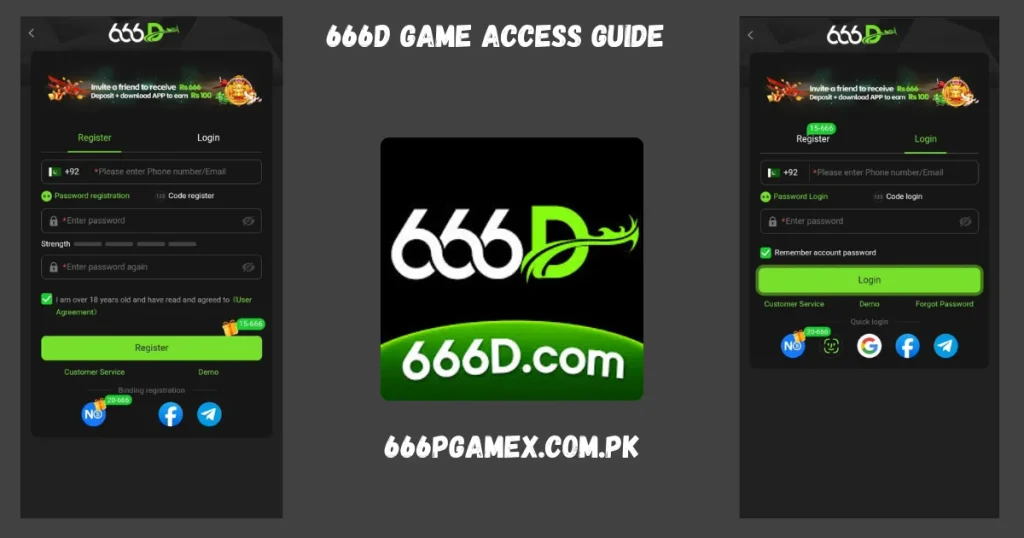
To register on 666D Game, open the account screen and select Register. The 666D Game form keeps the steps together. The form has a phone number or email field, with Pakistan’s +92 code selected. It offers Password registration and Code register.
For password registration, enter the requested phone number or email, create a password and repeat it in the confirmation field. A strength indicator appears below the password box. Tick the checkbox confirming that you are at least 18 and have read the User Agreement, then press Register.
Customer Service and Demo links also appear, alongside social sign-in or account-binding icons. Their functions are not explained in the image, so follow the on-screen instructions. Keep your password private.
Log In
Select Login beside Register on 666D Game, then enter the linked phone number or email and requested credentials. If offered a code-based method, follow its instructions. Never share verification codes. If login fails, recheck the details or contact Customer Service.
Download and Install the APK
To access the Android app, open the 666D Game page you normally use and look for its app download option. Select the link provided by that service and wait for the APK file to finish downloading. Open it from your Downloads folder and follow Android’s installation prompts. If Android asks permission to install apps from that source, enable it only if you trust the source, then disable it again after installation.
The screens do not show the APK size, version, package name or minimum Android requirement, so do not guess these details. Avoid unrelated download sites. If the option is missing, ask Support where the app is provided; a filename containing 666D alone does not prove authenticity.
Checks Before You Start
Read the User Agreement and age requirement before creating an account. Review game instructions and account terms, keep login details private, and avoid messages asking for passwords or codes. The 666D screenshots show menu labels, not every option’s full terms.
Pros and Cons
| Pros | Cons |
|---|---|
| Dark interface with clearly visible categories | Some game rules are not explained on the home screen |
| Separate sections for Hot, Mini Games, Slot and Cards | APK technical specifications are not displayed |
| Profile menu includes account and security options | Some menu options require further exploration |
| Registration offers phone, email and code-based options | Account recovery instructions are not shown |
| Support and Customer Service options are visible | Language choices are not listed |
Frequently Asked Questions
A Demo link appears on the registration screen, but its access requirements and available content are not specified.
The Profile menu includes a Language option, with English displayed as the selected language.
It appears in the Profile menu as an account-related setting, but its specific functions are not described.
The displayed screens do not provide recovery instructions. Contact Customer Service for guidance about account access.
Conclusion
666D Game combines game categories, Mini Games and account shortcuts. The 666D Game layout keeps these areas easy to locate. Its Profile menu includes records, settings, support and language options; registration shows phone or email entry with password and code methods. Use a trusted app source and check the file before opening it. Technical specifications and full game rules are not visible in the supplied screens.
Download links
How to install 666D Game APK Features, Registration and Android Guide 2026 APK?
1. Tap the downloaded 666D Game APK Features, Registration and Android Guide 2026 APK file.
2. Touch install.
3. Follow the steps on the screen.